How to Spot a Fake Crypto Wallet App Before You Install It

A fake crypto wallet doesn’t need to look suspicious.
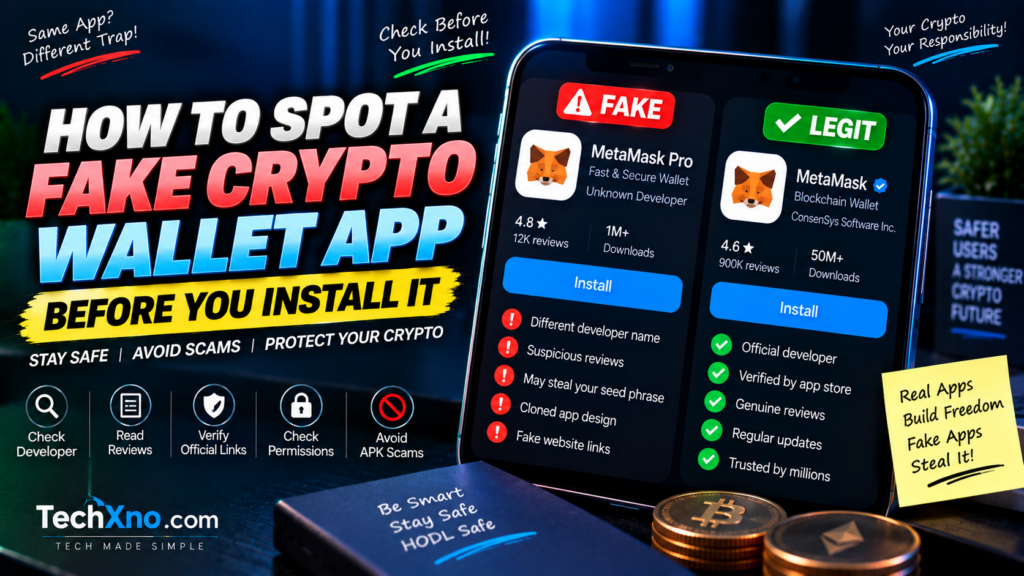
It can have a polished logo, thousands of apparent reviews, professional screenshots and a name almost identical to the wallet you’re searching for. It may even appear through an advertisement or search result that looks convincing enough that you never think to question it.
That’s what makes fake wallet apps particularly dangerous. With an ordinary fake app, you might lose some personal information or end up with annoying malware. With a malicious crypto wallet, exposing your seed phrase or private keys can give an attacker control over the assets associated with that wallet, and blockchain transactions generally don’t come with a convenient “undo” button.
The safest time to discover that a crypto wallet app is fake is therefore before you install it—and definitely before you enter a recovery phrase or transfer funds.
Fortunately, fake wallet scams usually depend on you skipping verification. A few minutes spent checking the source, developer, website and app behavior can reveal warning signs that a convincing icon alone won’t.
Here’s how to spot a fake crypto wallet app before installing it and what to do if you’ve already interacted with something suspicious.
1. Start From the Wallet’s Official Website, Not a Search Ad
One of the simplest habits in crypto security is also one of the most valuable: don’t blindly search for a wallet name and install the first thing you see.
Search engines can display advertisements before normal results, and scammers can create websites with names and designs intended to resemble legitimate services. Even when malicious advertising or impersonation is eventually removed, you don’t want to be the person who discovers it first.
Instead, independently verify the wallet’s official website and use the download links provided there to reach the appropriate app store or official distribution channel.
For example, if you’re looking for a well-known wallet, confirm that you’re on its genuine domain rather than a lookalike containing an extra word, swapped character, unusual subdomain or different domain extension.
Don’t rely entirely on appearance. A scammer can copy a logo, page layout, screenshots and marketing text far more easily than they can become the legitimate organization behind the product.
Bookmarking the verified official website of a wallet you regularly use can also reduce the chance that you’ll accidentally visit an impersonation page later.
The principle is straightforward:
Search can help you discover a product. The official verified source should help you install it.
2. Check the App Developer, Not Just the Wallet Name
Suppose you search an app store for a popular wallet and see two results with almost identical names and icons.
Which one is real?
The logo isn’t enough.
Open the app listing and inspect the developer or publisher information. Compare it with information provided by the wallet’s official website and other official channels.
Look carefully for small differences.
A fake listing might use the legitimate product name but attach words such as “Official,” “Pro,” “Web3,” “Secure,” or “New Version” to make itself appear authentic. It may also use a developer name that sounds plausible without actually belonging to the real company or project.
Check whether the developer has other legitimate applications, whether the support information makes sense, and whether the app-store listing reached from the project’s official website matches what you’re seeing.
This matters because scammers benefit from a common shortcut:
“The name and logo look right, so it must be right.”
In crypto, that’s not enough verification.
Treat the wallet name as the beginning of your check, not the end.
3. Don’t Trust Downloads and Reviews Alone
A large download count or a high rating can provide useful context, but neither should be treated as proof that a crypto wallet is legitimate.
Reviews can be manipulated. Fake positive reviews can make a malicious application look established, while copied or generic comments can create an illusion of trust.
Instead of only looking at the star rating, read a selection of reviews carefully.
Watch for repetitive language, dozens of vague five-star comments saying almost nothing, strange bursts of reviews over a short period, or complaints describing unexpected seed-phrase requests, missing funds or behavior that doesn’t match the genuine wallet.
Also check the dates.
If an app claims to represent a wallet that has existed for years but the listing and reviews appear extremely recent, investigate further.
At the same time, don’t assume a legitimate wallet will have perfect reviews. Real applications receive complaints too. Bugs, user mistakes, network fees and support frustrations can all produce negative ratings.
You’re looking for consistency between the app’s history, developer identity, official links and reputation, not one magical number that says “safe.”
A scam with 4.8 stars is still a scam.
4. Treat Seed Phrase Requests as a Critical Security Moment
Your wallet’s seed phrase, also called a recovery phrase or secret recovery phrase depending on the wallet, is one of the most sensitive pieces of information in self-custody crypto.
Anyone who obtains the phrase may be able to recreate the wallet and control the associated assets.
That means you should slow down dramatically whenever any application, website, support representative, form or message asks you to enter it.
There are legitimate circumstances where a genuine wallet application may require a recovery phrase—for example, when you intentionally restore an existing wallet inside the verified official wallet application.
The danger is context.
A random website claiming that you must “verify your wallet” by entering the phrase is a major warning sign.
A supposed support agent asking you to send your phrase is a major warning sign.
A form promising to “synchronize,” “validate,” “upgrade,” “unlock” or “secure” your wallet by entering the phrase should be treated as highly suspicious.
Never send a recovery phrase through email, Telegram, Discord, WhatsApp, social media or a support ticket.
And don’t store it casually in screenshots or unprotected cloud notes simply because that’s convenient.
Your recovery phrase is not a password-reset code.
There is no legitimate customer-support reason for another person to need it.
5. Be Extremely Careful With Crypto Wallet APK Files
Android gives users more flexibility than platforms that restrict software installation to one central app store, but that flexibility creates another attack opportunity.
You may encounter websites, Telegram groups, YouTube descriptions or social posts offering a wallet as an APK file.
Sometimes legitimate Android software is distributed directly by its developer. But an APK downloaded from an unverified third-party source can also be modified, repackaged or completely fake.
That’s why “I scanned the APK and it looked clean” shouldn’t be your only security check.
A malicious wallet doesn’t necessarily need to behave like traditional malware. If its interface simply convinces you to enter a seed phrase that is then transmitted to an attacker, the result can still be catastrophic.
For mainstream wallets available through normal official distribution channels, there’s rarely a good reason for a beginner to hunt for an APK from an unknown download site.
If a website says:
“Play Store version not working—download our special APK here.”
don’t treat that as a helpful shortcut.
Treat it as a reason to verify everything again.
Convenience is not worth gambling a wallet on.
6. Review App Permissions and Behavior After Installation
Even after you’ve verified the source and installed the app, stay alert to behavior that doesn’t make sense.
Android and iOS applications can request permissions for legitimate reasons, but a wallet shouldn’t receive unlimited trust simply because you’ve installed it.
Ask whether a requested permission makes sense for the feature you’re using.
Camera access, for example, can be reasonable when scanning QR codes. Other permissions may require more explanation depending on the wallet’s functionality.
More importantly, pay attention to what the app asks you to do.
Does it immediately pressure you to import a wallet?
Does it claim your account must be “validated” by entering a recovery phrase?
Does it redirect you to strange external websites?
Does it display urgent warnings that your funds will disappear unless you complete some verification process?
Scams often manufacture urgency because careful users are harder to trick.
“Act in the next five minutes or lose everything” is exactly the kind of message that should make you stop acting for five minutes.
Open the official wallet documentation independently and verify the instruction.
7. Watch for Fake Wallet Support on Social Media
You don’t even need to install a fake application to encounter a wallet scam.
Post something like:
“My wallet transaction is stuck. Can anyone help?”
and you may quickly receive messages from accounts claiming to be “Wallet Support,” “Admin,” “Help Desk,” or a support employee.
Some will use official logos. Some will have usernames that differ from legitimate accounts by one character. Some may direct you to a fake “wallet synchronization” website.
The objective is often the same: get your recovery phrase, private key, wallet approval or another piece of information/access that lets the attacker steal assets.
Never assume someone is legitimate because they contacted you immediately and seems to understand your problem.
Navigate to the wallet’s official support resources yourself.
Be especially suspicious if someone asks you to:
Send your seed phrase
Send your private key
Import your wallet into an unfamiliar application
Connect to an unknown website
Scan a random QR code
Pay a fee to “unlock” or “verify” your wallet
Share your screen while sensitive wallet information is visible
Good support should help you troubleshoot without requiring the secrets that control your funds.
8. What to Do If You Already Installed a Fake Crypto Wallet
If you installed something suspicious but never entered a seed phrase, private key or sensitive information, don’t panic—but don’t continue using it either.
Disconnect it from anything you’ve connected where appropriate, remove the suspicious application and review the device for other signs of compromise. Make sure you’re obtaining the legitimate wallet only through verified official sources.
The situation becomes much more serious if you entered your seed phrase or private key into a wallet you now believe was malicious.
In that case, simply uninstalling the fake app does not make the exposed phrase secret again.
Assume that a recovery phrase entered into a malicious application may be compromised.
If assets remain associated with that exposed wallet, the safer approach is generally to establish a new wallet with a new recovery phrase using a trusted environment and verified software, then move remaining assets away from addresses controlled by the compromised credentials as appropriate.
Do not create the new wallet by importing the old compromised recovery phrase. That simply recreates the same compromised keys.
Also be careful during this stage. People searching for “recover stolen crypto” are frequently targeted by a second wave of scammers promising guaranteed recovery.
Don’t send additional crypto to somebody claiming they can magically reverse a blockchain transaction.
If significant funds are involved, consider getting assistance from a reputable security professional and reporting the incident to appropriate platforms or authorities in your jurisdiction.
Speed can matter after credential exposure, but rushing into another scam helps nobody.
Final Thoughts
Learning how to spot a fake crypto wallet app isn’t about memorizing one warning sign.
A sophisticated fake may have a professional logo. It may have convincing screenshots. It may have positive reviews. It may even imitate the real wallet’s interface closely enough that a beginner sees nothing unusual.
That’s why you should verify several things together.
Start from the wallet’s confirmed official website. Follow its official download path. Check the developer or publisher. Review the listing history and feedback. Be cautious with third-party APKs and unexpected permissions. Most importantly, understand how sensitive your seed phrase and private keys are.
The few minutes you spend verifying an app before importing a wallet are insignificant compared with the time you’ll spend trying to recover from a compromised recovery phrase.
Crypto security doesn’t require you to become paranoid about every button you press.
It requires you to stop treating “looks legitimate” as the same thing as “verified legitimate.”
When an application will potentially control access to real money, that’s a distinction worth making.
Frequently Asked Questions
Can a fake crypto wallet steal my crypto?
Yes. A malicious wallet may attempt to steal sensitive credentials such as a recovery phrase or private key, or manipulate users into actions that expose their assets. The exact attack method can vary, which is why verifying wallet software before using it is important.
How can I check whether a crypto wallet app is legitimate?
Start from the wallet project’s verified official website and use its official download links. Compare the app-store developer information, website, support details and listing with the project’s official information rather than relying only on the name, logo or star rating.
Is a crypto wallet safe if it’s on Google Play or the Apple App Store?
Official app stores provide important security controls, but users should still verify that they’re installing the correct application from the legitimate developer. Don’t treat app-store presence alone as a guarantee that you’ve selected the right wallet.
Can I give my seed phrase to crypto wallet support?
No legitimate support representative should need you to send them your seed phrase or private key. Treat anyone asking for those secrets as a serious security risk.
Is it safe to download a crypto wallet APK?
Only consider direct APK distribution when you’ve independently verified that the legitimate wallet developer officially provides it and you understand what you’re installing. Beginners are generally safer following the wallet’s verified official download instructions rather than using APK files from third-party websites, messages or social posts.
What happens if someone gets my seed phrase?
A recovery phrase can provide control over the wallet keys derived from it. If you believe yours has been exposed, treat the wallet as potentially compromised and take appropriate steps to move remaining assets to a newly generated wallet using trusted software and a new recovery phrase.
Does uninstalling a fake wallet make my seed phrase safe again?
No. If you already entered your recovery phrase into malicious software, uninstalling that software cannot make the exposed phrase secret again. Treat the credentials as potentially compromised.
Can stolen crypto be recovered?
Recovery can be difficult and depends heavily on the circumstances. Be extremely cautious of people who contact victims promising guaranteed crypto recovery in exchange for upfront payments, wallet access or recovery phrases; recovery scams frequently target people who have already lost funds.